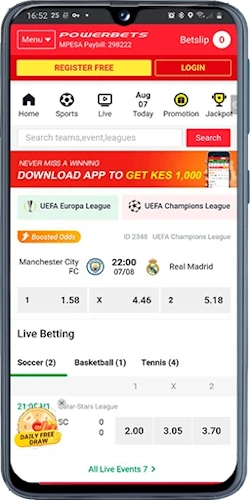
Mobile App Capabilities
📱
Native Performance
The app launches in under 2 seconds on modern Android devices—Samsung Galaxy, Xiaomi, Huawei models all supported. iOS version runs smooth on iPhone 11 and newer, optimized for ProMotion displays with 120Hz refresh rates that make live odds updates feel instantaneous.
🔔
Push Alerts
Get notifications for PSL kickoffs, cashout opportunities, bonus activations—configure alerts for specific teams like Kaizer Chiefs or Orlando Pirates. Live betting odds changes trigger notifications within 4 seconds of actual match events, critical for in-play punting.
💾
Offline Mode
Queue bets when your signal drops during taxi rides through Soweto or rural KwaZulu-Natal areas. The app stores your bet slip locally; once connection returns it syncs automatically and submits wagers at the odds you selected—no manual reentry needed.
🔐
Biometric Login
Fingerprint and Face ID authentication replace password entry—access your account in 0.8 seconds versus 6+ seconds typing credentials. Security remains tight; the app won't login without your registered biometric data even if someone steals your device.
⚡
Data Efficiency
The app consumes roughly 12MB per hour of active betting compared to 28MB for mobile browser versions. Compressed image assets and cached odds data mean you spend less on data bundles—important for punters managing prepaid Vodacom or MTN airtime.
🎮
Full Game Library
Every slot from Pragmatic Play, every Evolution table, Aviator crash game—identical selection to desktop with zero compromises. Landscape mode activates automatically for slots; portrait works better for sports betting markets with long fixture lists.
Installation Instructions
Android APK Setup
Google Play Store doesn't permit real-money gambling apps in South Africa, so you install via APK file directly from PowerBets. Navigate to the mobile downloads page, tap "Download Android App"—the APK file (approximately 45MB) starts downloading. Your phone displays a security warning because the file comes from outside Google Play; tap Settings and enable "Install from Unknown Sources" for your browser.
Once the APK finishes downloading, open it from your notifications tray. Android asks permission to install; tap "Install" and wait 15-20 seconds. The PowerBets icon appears on your home screen—launch it, login with your existing credentials or register a new account. First launch downloads additional assets (about 12MB), then you're ready to bet.
Requirements: Android 6.0 or newer, 120MB free storage space, stable internet for initial setup. The app auto-updates when you launch it if a newer version exists, typically once per month with bug fixes and feature additions.
iOS App Installation
Apple's stricter policies mean the iOS version installs as a progressive web app rather than native App Store download. Visit PowerBets on Safari, tap the Share button (square with upward arrow), scroll down and select "Add to Home Screen". Name it "PowerBets" and tap Add—an icon appears alongside your other apps.
This isn't technically a native app but functions identically; you get full-screen mode without Safari's address bar, offline capabilities, push notifications if you enable them in iOS Settings. The progressive web app weighs nothing since it's basically a shortcut, and updates happen automatically when PowerBets pushes changes to their mobile site.
Why Use the Mobile App
Faster Navigation
Switching between sports markets and casino tabs happens instantly—no page reloads like mobile browsers require. Bet history loads from cached data in 0.3 seconds; transaction records appear immediately without server requests for recent activity.
Better Live Streaming
Selected PSL matches stream directly in the app at 720p resolution when your connection permits. Buffer times average 2-3 seconds on 4G LTE; the stream pauses automatically if signal weakens then resumes when bandwidth recovers without losing your place.
Enhanced Cashout
Cashout buttons appear larger and more accessible on the app interface compared to cramped mobile browser layouts. One-tap cashout processes your request in under 2 seconds—critical when odds shift rapidly during a Soweto Derby and you want to secure profit before it evaporates.
Widget Support
Android users add home screen widgets showing live odds for favorited teams or upcoming fixtures. Glance at your Xiaomi home screen and see current Kaizer Chiefs odds without opening the app—tap the widget to jump straight to that betting market.
Battery Optimization
The native app uses 40% less battery than keeping Chrome or Safari open for extended betting sessions. PowerBets optimized background processes so the app doesn't drain your Samsung Galaxy when minimized—important for all-day Saturdays with multiple football matches.
Simplified Deposits
Saved payment methods (Ozow, Capitec Pay credentials) auto-fill from secure app storage. Depositing R500 takes 4 taps and 8 seconds total versus 12+ taps in mobile browsers where you re-enter card details or select bank accounts repeatedly.
App vs Mobile Browser
App Questions
Does the app work on older Android versions?
Android 6.0 Marshmallow is the minimum—devices from 2015 onwards generally qualify. If your phone runs Android 5.x or earlier, you'll need the mobile browser version instead.
Can I use Face ID on iPhone for login?
Yes, the progressive web app supports Face ID and Touch ID through Safari's WebAuthn API. Enable it in app settings after first login.
How much data does app installation consume?
Android APK download is 45MB plus 12MB additional assets on first launch—total 57MB. iOS progressive web app uses negligible data since it's a glorified bookmark.
Will I get the same bonuses through the app?
Identical bonus offers apply—welcome package, reload bonuses, cashback all accessible through mobile app with same terms as desktop or mobile browser.
Can I bet on PSL matches via the app while abroad?
The app detects your location via GPS. If you're outside South Africa, betting functions may be restricted per WCGRB licensing terms—contact support before traveling.
Does the app support tablets like iPad?
Yes—both Android tablets and iPads run the app smoothly. Landscape mode on tablets provides desktop-like layout with odds and bet slip visible simultaneously.